









The New ON App is live!

To charge seamlessly at ON Power charging stations, all customers need to sign in to the updated ON app and add a payment card. This applies to everyone – including customers who only use the ON Key.
What do I need to do to continue charging at ON charging stations?
What do I need to do to continue charging at ON charging stations?
I use the ON app
Open the ON app. You may need to update it through the App Store or Google Play Store.
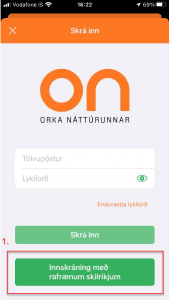
Sign in using electronic ID (eID).
The first time you charge with a QR code in the new app, you will be automatically guided through adding a payment card. If not, follow step 4 below.
Tap Me in the bottom-right corner of the screen.
Tap Payment Methods.
Tap Add Payment Card and enter your payment card details.
I have a monthly subscription
Open the ON app and sign in using electronic ID (eID).
Tap the QR code icon on the card on the right and scan the charging station.
Tap Proceed to payment and select My Access. Do not choose Apple Pay or Google Pay.
You only need to do this the first time you charge.

Open the ON app. You may need to update it through the App Store or Google Play Store.
Sign in using electronic ID (eID).
The first time you charge with a QR code in the new app, you will be automatically guided through adding a payment card. If not, follow step 4 below.
Tap Me in the bottom-right corner of the screen.
Tap Payment Methods.
Tap Add Payment Card and enter your payment card details.
I have a monthly subscription
Open the ON app and sign in using electronic ID (eID).
Tap the QR code icon on the card on the right and scan the charging station.
Tap Proceed to payment and select My Access. Do not choose Apple Pay or Google Pay.
You only need to do this the first time you charge.

I use the ON key
Open the ON app on or after September 1. If you don't have the app yet, download it from the App Store or Google Play.
Sign in using electronic ID, or use your email and password if that's how you signed in before.
Tap Me in the bottom-right corner.
Select Payment methods.
Tap Add payment method and enter your card details.
Your ON Key should now appear in your Wallet.
Can't see your ON Key? Simply tap Add charge key.
Select Read NFC Key and hold the key against the back of your phone.
I have a monthly subscription
Scan the ON Key at the nearest charging station and enjoy charging anywhere, anytime.

I use the ON key
Open the ON app on or after September 1. If you don't have the app yet, download it from the App Store or Google Play.
Sign in using electronic ID, or use your email and password if that's how you signed in before.
Tap Me in the bottom-right corner.
Select Payment methods.
Tap Add payment method and enter your card details.
Your ON Key should now appear in your Wallet.
Can't see your ON Key? Simply tap Add charge key.
Select Read NFC Key and hold the key against the back of your phone.
I have a monthly subscription
Scan the ON Key at the nearest charging station and enjoy charging anywhere, anytime.
Ég er í mánaðarlegum viðskiptum
Með ON lykli í mánaðarlegum viðskiptum getur þú byrjað að hlaða áhyggjulaust.
Ef þú hleður í appi og ert í mánaðarlegum viðskiptum þarftu að gera eftirfarandi:
Skráðu þig inn í nýtt ON app með rafrænum skilríkjum
Ýttu á QR kóða merkið á kortinu hægra megin og skannaðu hleðslustöðina.
Ýttu á Fara í greiðslu og veldu Aðgangurinn minn. Ekki velja Apple/Google Pay.
Þú þarft aðeins að gera þetta fyrst þegar þú hleður.
Ég er í mánaðarlegum viðskiptum
Með ON lykli í mánaðarlegum viðskiptum getur þú byrjað að hlaða áhyggjulaust.
Ef þú hleður í appi og ert í mánaðarlegum viðskiptum þarftu að gera eftirfarandi:
Skráðu þig inn í nýtt ON app með rafrænum skilríkjum
Ýttu á QR kóða merkið á kortinu hægra megin og skannaðu hleðslustöðina.
Ýttu á Fara í greiðslu og veldu Aðgangurinn minn. Ekki velja Apple/Google Pay.
Þú þarft aðeins að gera þetta fyrst þegar þú hleður.
Frequently Asked Questions
What do I need to do to continue charging at ON charging stations after the new ON app is live?
1) Download the ON app from the Apple Store or Google Play Store if you don't already have it. If you have the app today, you might need to update it in the App Store or Google Play Store.
2) Log in to the new ON app with your electronic ID.
3) Add your credit card information under Payment cards or Payment methods.
4) If you use an ON key, it will appear automatically.
Otherwise, it's very easy to add and activate it in the app:
Press Wallet
Select Add payment card
Press Read with NFC and hold the key against the back of your phone.
There are three ways to log in to the ON app.
With electronic credentials. This way, you can become a Key Customer of ON if you have domestic electricity in your business with ON.
Create an account without a personal identification number, i.e., create a username and password.
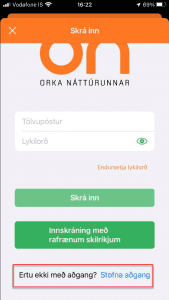
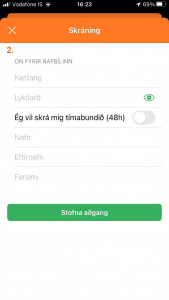
Create an account that is only active for 48 hours.
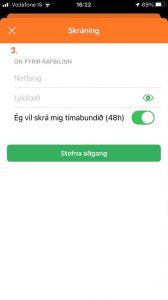
What do I need to do to continue charging at ON charging stations after the new ON app is live?
1) Download the ON app from the Apple Store or Google Play Store if you don't already have it. If you have the app today, you might need to update it in the App Store or Google Play Store.
2) Log in to the new ON app with your electronic ID.
3) Add your credit card information under Payment cards or Payment methods.
4) If you use an ON key, it will appear automatically.
Otherwise, it's very easy to add and activate it in the app:
Press Wallet
Select Add payment card
Press Read with NFC and hold the key against the back of your phone.
There are three ways to log in to the ON app.
With electronic credentials. This way, you can become a Key Customer of ON if you have domestic electricity in your business with ON.
Create an account without a personal identification number, i.e., create a username and password.
Create an account that is only active for 48 hours.
Where do I add my payment card details in the new app?
Tap Me in the bottom-right corner of the screen
Tap Payment methods
Select Add payment method and enter your card details
There are three ways to log in to the ON app.
With electronic credentials. This way, you can become a Key Customer of ON if you have domestic electricity in your business with ON.
Create an account without a personal identification number, i.e., create a username and password.
Create an account that is only active for 48 hours.
Where do I add my payment card details in the new app?
Tap Me in the bottom-right corner of the screen
Tap Payment methods
Select Add payment method and enter your card details
There are three ways to log in to the ON app.
With electronic credentials. This way, you can become a Key Customer of ON if you have domestic electricity in your business with ON.
Create an account without a personal identification number, i.e., create a username and password.
Create an account that is only active for 48 hours.
Hvernig hleð ég í ON appinu með því að skanna QR kóða?
Veldu Map/Kort neðst í vinstra horninu.
Ýttu á QR kóða merkið hægra megin á kortinu
Skannaðu QR kóðann á hleðslustöðinni – þú gætir þurft að samþykkja myndavélina fyrir appið í símanum
Ýttu á Fara í greiðslu þegar búið er að skanna QR kóðann
Veldu greiðslumáta: Greiða með korti, ekki velja Aðgangurinn þinn
Svæpaðu til að byrja!
There are three ways to log in to the ON app.
With electronic credentials. This way, you can become a Key Customer of ON if you have domestic electricity in your business with ON.
Create an account without a personal identification number, i.e., create a username and password.
Create an account that is only active for 48 hours.
Hvernig hleð ég í ON appinu með því að skanna QR kóða?
Veldu Map/Kort neðst í vinstra horninu.
Ýttu á QR kóða merkið hægra megin á kortinu
Skannaðu QR kóðann á hleðslustöðinni – þú gætir þurft að samþykkja myndavélina fyrir appið í símanum
Ýttu á Fara í greiðslu þegar búið er að skanna QR kóðann
Veldu greiðslumáta: Greiða með korti, ekki velja Aðgangurinn þinn
Svæpaðu til að byrja!
There are three ways to log in to the ON app.
With electronic credentials. This way, you can become a Key Customer of ON if you have domestic electricity in your business with ON.
Create an account without a personal identification number, i.e., create a username and password.
Create an account that is only active for 48 hours.
Af hverju er tekin heimildarbeiðni á greiðslukortið mitt áður en hleðsla hefst?
Áður en hleðsla hefst er tekin heimildarbeiðni á greiðslukortið þitt sem er skráð í ON appinu. Upphæð heimildarbeiðninnar getur verið mismunandi eftir hleðslustöð hverju sinni og er notuð til að staðfesta að kortið sé virkt og geti greitt fyrir hleðsluna. Þegar hleðslu lýkur er aðeins gjaldfært fyrir raunverulegri notkun.
There are three ways to log in to the ON app.
With electronic credentials. This way, you can become a Key Customer of ON if you have domestic electricity in your business with ON.
Create an account without a personal identification number, i.e., create a username and password.
Create an account that is only active for 48 hours.
Af hverju er tekin heimildarbeiðni á greiðslukortið mitt áður en hleðsla hefst?
Áður en hleðsla hefst er tekin heimildarbeiðni á greiðslukortið þitt sem er skráð í ON appinu. Upphæð heimildarbeiðninnar getur verið mismunandi eftir hleðslustöð hverju sinni og er notuð til að staðfesta að kortið sé virkt og geti greitt fyrir hleðsluna. Þegar hleðslu lýkur er aðeins gjaldfært fyrir raunverulegri notkun.
There are three ways to log in to the ON app.
With electronic credentials. This way, you can become a Key Customer of ON if you have domestic electricity in your business with ON.
Create an account without a personal identification number, i.e., create a username and password.
Create an account that is only active for 48 hours.
Do I need to download a new ON app?
No. If you already have the ON app, it will be updated automatically. After updating, simply sign in and add your payment card details under Payment methods.
If you do not currently have the app, you can download the updated ON app from the App Store or Google Play Store.
There are three ways to log in to the ON app.
With electronic credentials. This way, you can become a Key Customer of ON if you have domestic electricity in your business with ON.
Create an account without a personal identification number, i.e., create a username and password.
Create an account that is only active for 48 hours.
Do I need to download a new ON app?
No. If you already have the ON app, it will be updated automatically. After updating, simply sign in and add your payment card details under Payment methods.
If you do not currently have the app, you can download the updated ON app from the App Store or Google Play Store.
There are three ways to log in to the ON app.
With electronic credentials. This way, you can become a Key Customer of ON if you have domestic electricity in your business with ON.
Create an account without a personal identification number, i.e., create a username and password.
Create an account that is only active for 48 hours.
Can I still use my ON charging key?
Yes, absolutely. The ON charging key will continue to work as before. However, it is very important that you sign in to the new ON app and add your payment card details under Payment methods.
To add and activate your ON charging key in the app:
Open Wallet
Select Add charge key
Tap Read NFC Key and hold the key against the back of your phone
There are three ways to log in to the ON app.
With electronic credentials. This way, you can become a Key Customer of ON if you have domestic electricity in your business with ON.
Create an account without a personal identification number, i.e., create a username and password.
Create an account that is only active for 48 hours.
Can I still use my ON charging key?
Yes, absolutely. The ON charging key will continue to work as before. However, it is very important that you sign in to the new ON app and add your payment card details under Payment methods.
To add and activate your ON charging key in the app:
Open Wallet
Select Add charge key
Tap Read NFC Key and hold the key against the back of your phone
There are three ways to log in to the ON app.
With electronic credentials. This way, you can become a Key Customer of ON if you have domestic electricity in your business with ON.
Create an account without a personal identification number, i.e., create a username and password.
Create an account that is only active for 48 hours.
What if I only want to use the ON charging key and not the app?
All ON charging customers must register a payment card in the new version of the ON app in order to continue using the ON charging key.
There are three ways to log in to the ON app.
With electronic credentials. This way, you can become a Key Customer of ON if you have domestic electricity in your business with ON.
Create an account without a personal identification number, i.e., create a username and password.
Create an account that is only active for 48 hours.
What if I only want to use the ON charging key and not the app?
All ON charging customers must register a payment card in the new version of the ON app in order to continue using the ON charging key.
There are three ways to log in to the ON app.
With electronic credentials. This way, you can become a Key Customer of ON if you have domestic electricity in your business with ON.
Create an account without a personal identification number, i.e., create a username and password.
Create an account that is only active for 48 hours.
How do I sign in to the new app?
You can sign in to the new app using electronic ID or your email and password (we recommend using the same login method as before).
If you do not currently have the app, you can download it from the App Store or Google Play Store from September 1 onward.
There are three ways to log in to the ON app.
With electronic credentials. This way, you can become a Key Customer of ON if you have domestic electricity in your business with ON.
Create an account without a personal identification number, i.e., create a username and password.
Create an account that is only active for 48 hours.
How do I sign in to the new app?
You can sign in to the new app using electronic ID or your email and password (we recommend using the same login method as before).
If you do not currently have the app, you can download it from the App Store or Google Play Store from September 1 onward.
There are three ways to log in to the ON app.
With electronic credentials. This way, you can become a Key Customer of ON if you have domestic electricity in your business with ON.
Create an account without a personal identification number, i.e., create a username and password.
Create an account that is only active for 48 hours.
How do I add my ON charging key to the new app?
Open Wallet
Select Add charge key
Tap Read NFC Key and hold the key against the back of your phone
There are three ways to log in to the ON app.
With electronic credentials. This way, you can become a Key Customer of ON if you have domestic electricity in your business with ON.
Create an account without a personal identification number, i.e., create a username and password.
Create an account that is only active for 48 hours.
How do I add my ON charging key to the new app?
Open Wallet
Select Add charge key
Tap Read NFC Key and hold the key against the back of your phone
There are three ways to log in to the ON app.
With electronic credentials. This way, you can become a Key Customer of ON if you have domestic electricity in your business with ON.
Create an account without a personal identification number, i.e., create a username and password.
Create an account that is only active for 48 hours.
Hlökkum til að halda áfram að veita rafmagnaða upplifun í nýju ON appi
Ef þú lendir í vandræðum endilega sendu okkur línu á netspjallinu. Netspjallið er opið allan sólarhringinn.
Þú getur náð í okkur allan sólarhringinn í síma: 591-2700

